Best ADHD planner apps in 2026 (an honest review)
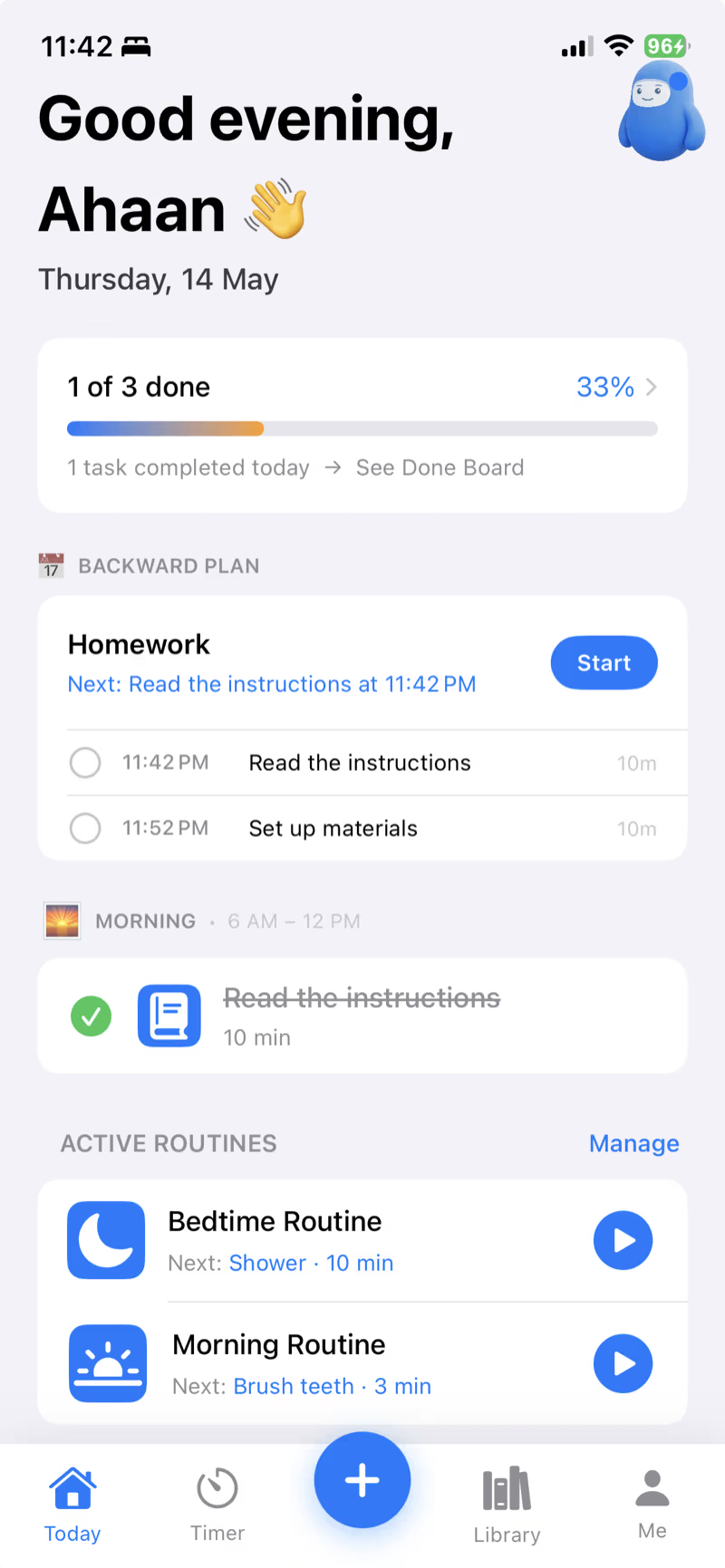
"Best ADHD planner app" listicles are usually written by people who haven't used the apps. We did the opposite: we used the top six ADHD planner apps for 30 days each, kept notes, and ranked them by what actually helps an ADHD brain — not by what looks good in a screenshot.
Yes, we make one of these apps (TimeNinja). We'll be honest about where it falls short too.
What we evaluated
- Time visibility — does it make time tangible, not abstract?
- Activation — does it help you actually start?
- Backward planning — does it work from deadlines?
- Task breakdown — can it decompose vague tasks?
- Learning loop — does it adapt to your real timing?
- Friction — how much setup before it pays off?
1. TimeNinja 🥷
Best for: ADHD adults and families who need deadline-driven planning + visual time.
Strengths: Backward planning is genuinely unique. Visual shrinking ring. AI Break It Down. Learns your real timing with 25–75% bands. Family Mode is great for parents.
Weak spots: iOS only today. No web app. Lifetime pricing is generous but yearly is the sweet spot (full pricing).
2. Tiimo
Best for: Visual schedule users who think in blocks.
Strengths: Beautiful visual schedule. Strong neurodivergent community.
Weak spots: No backward planning from a deadline — you still have to estimate. No real-timing learning loop. Premium is pricier than alternatives.
→ Full comparison: TimeNinja vs Tiimo
3. Routinery
Best for: Building rigid morning/evening routines.
Strengths: Solid routine-step UX. Quick to set up.
Weak spots: Routines only — no flexible task or deadline support. No AI breakdown.
4. Todoist / TickTick
Best for: Neurotypical project management adapted for ADHD.
Strengths: Mature ecosystem, every platform.
Weak spots: No native sense of time. No backward planning. Tasks pile up invisibly. Most ADHD users abandon within weeks.
5. Sunsama
Best for: ADHD knowledge workers who time-block their day.
Strengths: Forces daily planning ritual. Pulls from calendar + tasks.
Weak spots: $20/month. No visual time. Daily ritual is heavy if you're already overwhelmed.
6. Forest / Focus apps
Best for: Stopping phone-scroll spirals during work.
Strengths: Gamification works for some.
Weak spots: Doesn't help you plan or estimate. Solves one symptom, not the cause.
7. Morgen
Best for: People juggling multiple calendars.
Strengths: Pulls Google, iCloud, and Outlook into one view, and layers tasks from Todoist or Notion on top. A strong pick if your ADHD problem is calendar fragmentation.
Weak spots: Doesn't make the time inside a task visible, and doesn't learn how long things actually take you — TimeNinja doesn't try to unify your calendars, it focuses on exactly that.
8. Saner.AI
Best for: Brain-dump organizing.
Strengths: Dump unstructured thoughts in and its AI turns them into prioritized tasks and scheduled plans. Good if your bottleneck is capture, not execution.
Weak spots: The help mostly ends after organizing. TimeNinja's Capture step is deliberately lighter — the difference shows up after capture, in the Plan → Execute → Learn loop that adjusts your future estimates.
→ Full comparison: TimeNinja vs Saner.AI
9. Llama Life
Best for: Single-tasking with a countdown.
Strengths: Breaks work into short blocks with a visible timer, one task at a time. Pricing starts at $6/month. Closest in spirit to TimeNinja's visible-time approach.
Weak spots: The timer data stops at the session — it doesn't carry your real timings forward into future planning the way TimeNinja's Learn step does.
→ Full comparison: TimeNinja vs Llama Life
10. Goblin.tools
Best for: Task paralysis on a single vague task.
Strengths: Free, browser or app-based: type in "clean the kitchen" and it breaks it into micro-steps. Genuinely useful in the moment.
Weak spots: It's a one-off tool, not a planner — most people use it alongside something else (including TimeNinja) for the moments a task feels too big to start.
→ Full comparison: TimeNinja vs Goblin.tools
11. NotePlan
Best for: Markdown-native daily time-blocking, popular in ADHD and Autism communities.
Strengths: Notes, tasks, and calendar in one plain-text home, synced with your native calendar.
Weak spots: More manual than TimeNinja — you block your own time rather than the app learning your real durations for you.
The gap none of them fully closes
After 30 days each, one pattern emerged: every app assumes you can estimate how long tasks take. ADHD brains famously can't. So plans always slip — and the app gets blamed.
The fix isn't a better todo list. It's a system that:
- Plans backwards from a real deadline (not "today's todo list").
- Tracks how long tasks actually take.
- Uses your data to make the next plan realistic.
That's the thesis TimeNinja was built around. Whichever app you pick, look for those three things.
Quick decision guide
- You miss deadlines often → TimeNinja
- You need a fixed morning routine → Routinery or TimeNinja
- You're a knowledge worker who lives in calendars → Sunsama
- You just need to stop scrolling → Forest
- Your calendars are scattered across accounts → Morgen
- Your thoughts pile up faster than you can sort them → Saner.AI
- You want one task and one countdown at a time → Llama Life or TimeNinja
- One vague task is paralyzing you right now → Goblin.tools (it's free)
- You live in markdown and block your own time → NotePlan
How to choose the right ADHD planner for you
The "best" app depends on which part of the day breaks down for you:
- You lose track of time → prioritize visible timers and time-blocking (a visual-timer-first app).
- You can't start → prioritize task breakdown and low-friction capture.
- You forget routines → prioritize recurring, visual routines (especially for kids/families).
- You under- or over-estimate everything → prioritize an app that tracks your real timing and plans backwards from deadlines.
What makes an app genuinely ADHD-friendly
Beyond features, the design has to respect an ADHD brain. A quick checklist to judge any app:
- Makes time visible (not just numeric) — a shrinking timer you can feel.
- Low activation cost — capturing a task takes one tap or one sentence.
- Shame-free — missed tasks don't pile up or flash red; there's a calm second chance.
- Plans backwards from real deadlines, and learns your actual timing over time.
Free ADHD apps and free tiers
"Best free ADHD app" is one of the most common follow-up searches, so here's the honest landscape: Goblin.tools is fully free. Most of the others — TimeNinja included — are free to download with either a free tier or a trial: TimeNinja gives you a 7-day free trial of everything (pricing here), Tiimo and Routinery have limited free tiers, and Llama Life and Sunsama are trial-based. If budget is the constraint, start with Goblin.tools for breakdowns plus your phone's built-in timers — and upgrade to a dedicated app when the manual juggling becomes the bottleneck. If your main need is just visible time, see our visual timer guide; if you're weighing bigger-ticket help, here's the honest coach-vs-app cost comparison.
Frequently asked questions
What is the best planner app for ADHD in 2026?
It depends on what you struggle with most. This guide compares TimeNinja, Tiimo, Routinery, Todoist/TickTick, Sunsama, and Forest — the gap none fully closes is calibrating your real timing, then backward-planning from it, then supporting execution.
What should an ADHD planner app have?
Visible time, low-friction capture, backward planning from deadlines, task breakdown, and shame-free handling of missed tasks — not just a place to store a list.
Are there free ADHD planner apps?
Many offer free tiers or trials. TimeNinja is free to download with a 7-day trial of its premium features.
How is an ADHD planner different from a normal to-do app?
A normal to-do app stores tasks. An ADHD planner externalizes time and lowers the cost of starting — making the plan executable, not just recorded.